Spurbets Login Guide for Players in Kenya
Your Spurbets account is two fields away: a phone number and a password. Once you log in, you get access to the KSh 5,000,000 weekly tournaments, the daily Aviator freebets and 10% cashback on lost bets. The same details work on a computer, an Android phone and an iPhone. Log in to Spurbets and pick up right where you left off.
Spurbets Login Overview
Spurbets login uses your registered phone number and your password. There is no email login and no extra code at the login step. The process takes a few seconds.
The same login works on every version of Spurbets. Your balance, bonuses and bet history are stored on your account. You see the same information on any device.
| Parameter | Spurbets login |
|---|---|
| Login fields | Phone number and password |
| Email login | Not available |
| Password recovery | Forgot Password link |
| Devices | Desktop site, Android app, mobile website |
| Support | 24/7 at 0720006699 |
Account Details Required for Login
To log in to Spurbets, you need the phone number you used at registration and the password you created for your account.
- Your registered phone number in the format 0700 000 000.
- Your Spurbets account password.
Your phone number is also your M-Pesa wallet number on Spurbets. Keep the same Safaricom line active. Then both your login and your withdrawals keep working without interruption.
Spurbets Login Process
To log in, open the login form, enter your phone number and password, and press Play now. Each step is described below.
The form is the same on the desktop site, the mobile website and the Android app. Once you know it on one device, you know it on all of them.
Steps to Open the Login Form
To open the login form, click the Login button in the top right corner of spurbets.com. A window titled "Login to your account" appears.
- Go to spurbets.com.
- Find the Login and Register buttons in the top right corner.
- Click Login.
- Check that the window title reads "Login to your account".
The Login button appears on every page, including the game lobbies and the Promotions page. You can log in from any section without going back to the homepage.
Phone Number and Password Entry
In the login form, enter your registered phone number in the first field and your password in the second.
| Field | What to enter |
|---|---|
| Phone Number | The number you registered with, for example 0712 345 678 |
| Password | Your Spurbets account password |
The password field has an eye icon on the right. Tap it to see the characters you typed. It helps you catch a capital letter or an extra space before you submit the form.
Account Access With the Play Now Button
After you fill in both fields, press the green Play now button at the bottom of the form. Your account opens right away.
The Login and Register buttons in the header are replaced by your account and balance. From here you can open the wallet, check your promotions and start playing. If you do not have an account yet, tap Register in the "Don't have an account?" line under the form title.
Spurbets Login on Mobile
On Android, you can log in through the Spurbets app or the mobile website. On an iPhone, you log in through the mobile website in Safari. The login details are the same on every device.
| Device | Login method | Quick access |
|---|---|---|
| Android phone | Spurbets APK app | App icon on the home screen |
| Android phone | Mobile website in Chrome | Browser bookmark |
| iPhone | Mobile website in Safari | Home screen shortcut |
The Android app is installed from an APK file. An APK (Android Package Kit) is the installation file for Android apps outside Google Play. You download it with the Download App button in the side menu of spurbets.com. On an iPhone, open spurbets.com in Safari and tap Share, then Add to Home Screen. Spurbets then opens with a single tap.
Spurbets Password Recovery
If you forget your password, use the Forgot Password link in the login form. The reset works through your registered phone number. You can set a new password in a few minutes.
Password recovery keeps your balance and bonuses unchanged. Only the password changes.
Forgot Password Link Usage
The Forgot Password link is the green text under the Password field in the login form. It starts the password reset.
- Click Login in the top right corner.
- Tap Forgot Password under the Password field.
- Enter your registered phone number.
- Follow the confirmation instructions on screen.
Keep your phone nearby. The confirmation goes to the number linked to your account.
New Password Setup Steps
After you confirm your number, create a new password and use it to log in.
- Enter a new password.
- Repeat it if the form asks you to confirm it.
- Save the change.
- Log in with your phone number and the new password.
| Good password choice | What to avoid |
|---|---|
| At least 8 characters | Short codes like 1234 |
| Letters and digits together | Your phone number or birth year |
| A password unique to Spurbets | Your M-Pesa PIN |
Save the new password in a safe place. A password manager on your phone works well.
Spurbets Account Features After Login
After login, you have full access to your balance, the M-Pesa wallet, all promotions, the casino and the sportsbook.
The left menu shows every section: Popular, New Games, Crash Games, Slots, Casino, Sports, Jackpots, Virtuals, Roulette, Promotions and Live Support.
Account Balance and Welcome Stake
Your balance appears in the header as soon as you log in. On your first login after registration, the KSh 20 Welcome Stake is already there.
The KSh 20 Welcome Stake is a no-deposit bonus. That means Spurbets gives it to you without a deposit. You can use it on crash games, casino games, virtuals and roulette. To check it, open your profile and look at the wallet balance.
M-Pesa Deposits and Withdrawals
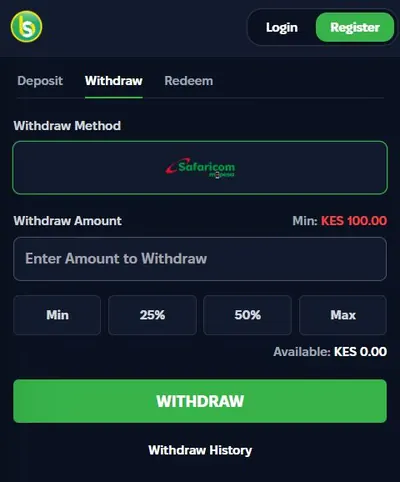
After login, the wallet lets you deposit and withdraw through Safaricom M-Pesa. It has three tabs: Deposit, Withdraw and Redeem.
| Wallet tab | Function | Limits |
|---|---|---|
| Deposit | Top up with M-Pesa | KES 100 to KES 150,000 |
| Withdraw | Payout to your registered number | From KES 100 |
| Redeem | Activate a voucher or promo code | Depends on the code |
The Withdraw tab has Min, 25%, 50% and Max buttons. Max sends your full available balance in one tap. Withdrawals are paid to your registered M-Pesa number once your account is verified.
Promotions, Games and Sports Betting
A logged-in account can join every Spurbets promotion. It can also play the full game lobby and bet on sports.

- 10% daily cashback on lost bets, credited automatically
- KSh 50 for each friend who registers through your referral link, plus 10% of their deposits
- Weekly tournaments with KSh 1,000,000 on Crash Royale and KSh 4,000,000 on JetX
- KSh 100,000 in daily unwagered Aviator freebets
- Aviator Challenges with cash, freebets and Spurbets merchandise
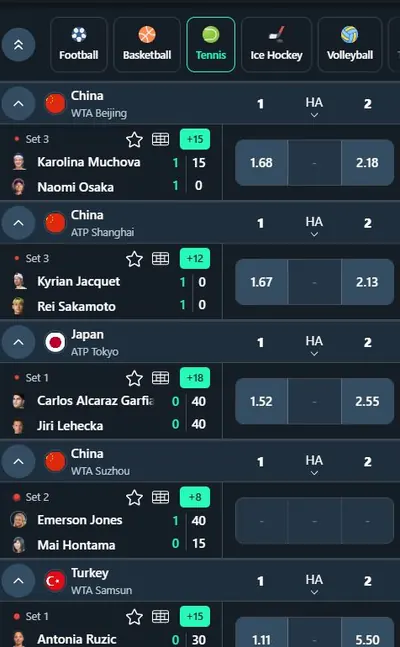
A freebet is a bet you place without using your balance. Unwagered means you can withdraw the winnings without betting them again. The game lobby includes Aviator, JetX, Sweet Bonanza and live Blackjack. The sportsbook covers football, basketball, tennis, ice hockey, volleyball and boxing, with live betting during matches.
Spurbets Login Problems and Solutions
Most Spurbets login issues come from the password or the phone number. Each one has a quick fix.
| Problem | Solution |
|---|---|
| Incorrect password | Tap the eye icon to check it, then use Forgot Password |
| Account not found | Enter the exact number you registered with |
| Form does not respond | Check your data bundle or switch to Wi-Fi |
| App does not open | Download the latest APK from spurbets.com |
| Lost Safaricom line | Restore the same number with Safaricom, then log in |
If the login form reappears after you press Play now, clear your browser cache and try again. For any other issue, the support team is available around the clock.
Spurbets Customer Support
Spurbets support is available 24/7 by phone, by email and through the Live Support section of the website. The team helps with login, passwords, payments and bonuses.
| Channel | Contact |
|---|---|
| Phone | 0720006699 |
| [email protected] | |
| Website | Live Support in the left menu |
When you contact support about login, give your registered phone number and describe the error message. Spurbets support never asks for your password or M-Pesa PIN. Keep them to yourself.
Frequently Asked Questions
QWhat Do I Need to Log In to Spurbets?
You need your registered phone number and your account password.
QCan I Log In to Spurbets With an Email Address?
No. Spurbets login works only with a phone number and a password.
QIs the Spurbets Login the Same in the App and on the Website?
Yes. The Android app, the mobile website and the desktop site use the same login details and the same account.
QHow Do I Recover My Spurbets Password?
Tap Forgot Password in the login form and enter your registered phone number. Then follow the steps to set a new password.
QWhy Can I Not Access My Spurbets Account?
The usual causes are a wrong password, a different phone number or a weak connection. Check each one, or call support at 0720006699.
QCan I Log In to Spurbets on Two Devices?
Yes. You can use the same login details on your phone and your computer, and your balance stays the same on both.